
Display Refrigerator fogging problems often start with setup
Display Refrigerator fogging problems often begin before products are loaded and before doors are opened all day. Early setup decisions strongly influence visibility, cooling stability, hygiene perception, and energy performance.
In foodservice, retail, hospitality, and shared kitchen environments, a fogging Display Refrigerator can reduce product appeal and complicate routine checks. It may also reveal humidity stress, airflow restriction, or incorrect startup conditions.
Because kitchen equipment now supports stricter food safety and efficiency targets, setup quality matters more than ever. A well-positioned Display Refrigerator usually performs more consistently, defogs faster, and protects cold-chain presentation standards.
Setup conditions shape Display Refrigerator fogging behavior
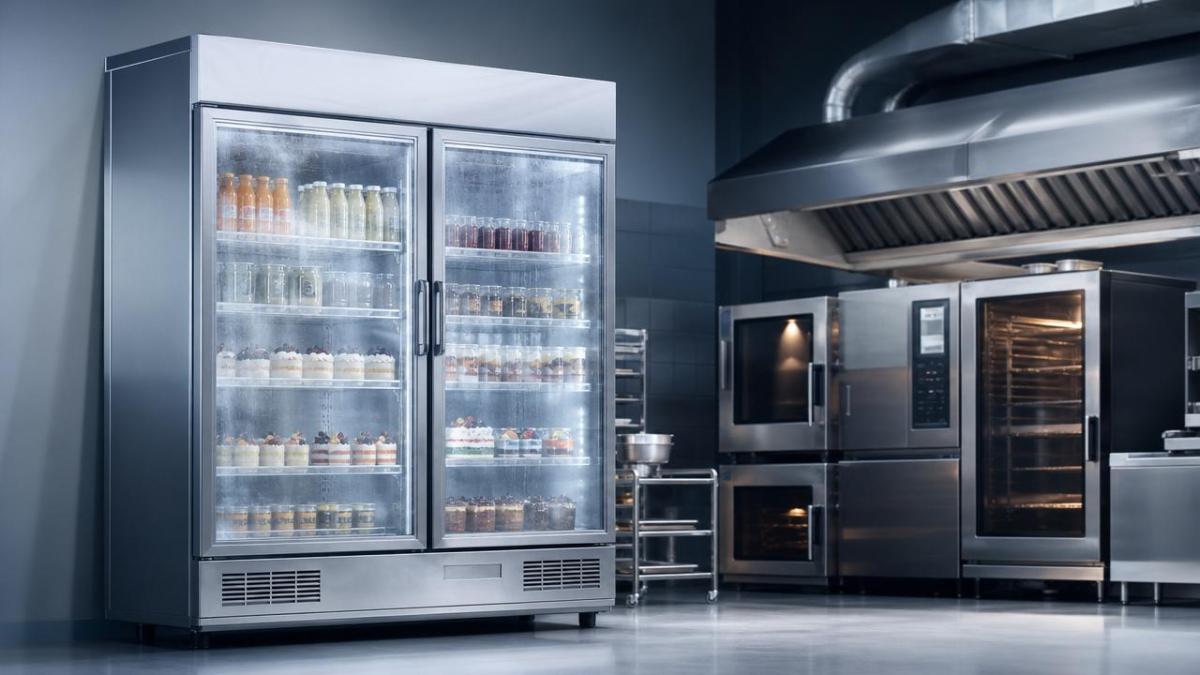
Fog appears when warm, moist air meets colder glass or internal surfaces. In a Display Refrigerator, this process is normal at times, but heavy or persistent fog usually points to setup-related imbalance.
The first risk factor is placement. Units installed near ovens, steam tables, fryers, dishwashers, or direct sunlight absorb extra heat and moisture. Glass surfaces then reach condensation points more frequently.
The second factor is clearance. A Display Refrigerator needs enough space around intake and exhaust zones. Restricted ventilation increases cabinet temperature swings and can weaken anti-condensation performance.
The third factor is leveling. If the cabinet is uneven, door alignment may shift. Small gasket gaps can allow continuous humid air entry, creating fogging, frost, and unstable cooling cycles.
Initial temperature settings also matter. Starting too cold too fast may chill glass rapidly while the room remains humid. This can create dramatic condensation before the system stabilizes.
Basic fogging mechanisms
- Surface temperature drops below ambient dew point.
- Air circulation inside the cabinet becomes uneven.
- Door sealing allows repeated moisture infiltration.
- Heat sources raise local humidity around the Display Refrigerator.
Industry background and current operational concerns
The kitchen equipment sector is moving toward smarter control, energy efficiency, and better visibility management. Within this trend, the Display Refrigerator has become both a storage tool and a presentation asset.
In commercial kitchens, convenience stores, bakeries, cafés, hotels, and food processing support areas, clear display glass supports product confidence. Fogging weakens that visual function and can trigger complaints or extra labor.
Environmental conditions are also changing. Open kitchens, mixed hot-and-cold zones, and higher sanitation washdown frequency can raise humidity. As a result, Display Refrigerator installation standards deserve more attention.
These signals are not isolated technical details. They affect product visibility, cleaning workload, compressor stress, and trust in daily temperature control.
Business value of preventing Display Refrigerator fogging early
A clear Display Refrigerator supports faster visual inspection. Staff can confirm stock, check presentation, and notice spills or packaging damage without opening doors too often.
That benefit matters across the broader kitchen equipment landscape. Better visibility can reduce unnecessary door openings, which helps maintain internal temperature and lowers moisture intrusion.
There is also a product quality dimension. Fogging can hide early icing, pooled water, or airflow obstruction. If these issues are missed, product holding conditions may drift out of target ranges.
From an energy perspective, a Display Refrigerator working against excess humidity tends to cycle harder. Preventing setup errors can support more stable operation and reduce avoidable power consumption.
In customer-facing spaces, visual clarity has direct commercial value. Cakes, drinks, ready meals, dairy items, and chilled desserts sell better when the cabinet remains clean and transparent.
Practical value areas
- Supports cold-chain consistency.
- Improves product presentation.
- Reduces cleaning and manual defogging effort.
- Helps maintain energy-efficient operation.
- Strengthens routine compliance checks.
Typical setup scenarios where fogging risk increases
Not every Display Refrigerator faces the same environmental load. Fogging patterns often depend on location, traffic level, surrounding equipment, and the type of chilled goods being displayed.
These examples show why a universal setting rarely works. A Display Refrigerator should be commissioned according to its actual thermal and humidity environment.
Practical setup recommendations for stable performance
Good installation practice starts with the room, not the control panel. Before startup, confirm local heat sources, airflow direction, floor level, and expected humidity peaks during operation.
Positioning and spacing
- Keep the Display Refrigerator away from direct sunlight.
- Avoid installation beside steam-producing or high-heat equipment.
- Preserve manufacturer-recommended ventilation space around the cabinet.
- Check that supply and exhaust paths remain unobstructed after loading.
Startup and temperature settings
- Allow the unit to stabilize before full stocking.
- Use target temperatures suitable for the product category.
- Avoid overcorrecting with excessively low settings.
- Verify actual cabinet temperature with an independent thermometer.
Door and airflow checks
- Confirm door closing action is smooth and complete.
- Inspect gaskets for compression gaps after installation.
- Do not block internal air channels with oversized packaging.
- Load products evenly to reduce cold and warm spots.
When these basics are ignored, a Display Refrigerator may appear defective even though the core issue is environmental or procedural.
Ongoing observation and next-step actions
After installation, monitor the Display Refrigerator during the first several operating days. Observe fogging at opening hours, peak service periods, cleaning times, and end-of-day recovery.
Record ambient conditions, door opening frequency, cabinet temperature, and visible condensation zones. Simple logs often reveal patterns that one-time inspection misses.
If fogging remains persistent, review setup before replacing components. Recheck placement, leveling, gasket contact, airflow clearance, and temperature parameters in that order.
A Display Refrigerator performs best when installation, environment, and operation work together. Early correction is usually less costly than long-term energy loss, spoiled presentation, or recurring maintenance calls.
The next practical step is to create a short commissioning checklist for every new Display Refrigerator. That single document can improve visibility, reduce fogging risk, and support more reliable cold-display performance.
Popular Tags
Kitchen Industry Research Team
Dedicated to analyzing emerging trends and technological shifts in the global hospitality and foodservice infrastructure sector.
Industry Insights
Join 15,000+ industry professionals. Get the latest market trends and tech news delivered weekly.
No spam. Unsubscribe anytime.
Hot Articles


Contact With us
Contact:
Anne Yin (Ceramics Dinnerware/Glassware)
Lucky Zhai(Flatware)