
Kitchen Automation Costs That Rarely Appear in the Pitch
Kitchen automation promises faster service and smarter workflows, but the real costs often hide beyond the sales pitch. From integrating a Heated Display, Refrigerated Worktable, Charbroiler, or Wok Range to training staff and managing maintenance, kitchen innovation can reshape budgets in unexpected ways. This article examines the overlooked expenses buyers, operators, and decision-makers should evaluate before investing.
For restaurants, hotels, central kitchens, and food processing operations, the question is rarely whether automation can improve consistency or labor efficiency. The real issue is whether the total cost of ownership remains workable after installation, onboarding, preventive service, software updates, and utility changes are fully accounted for over 3 to 7 years.
This matters to multiple stakeholders. Operators care about uptime, workflow disruption, and ease of use during peak hours. Procurement teams compare capital expense against service contracts, lead times, and spare parts access. Business decision-makers need a realistic model for payback, risk, and scalability across one site or 20 locations.
In the kitchen equipment industry, automation is no longer limited to large industrial systems. It now includes smart cooking equipment, connected refrigeration, automated prep lines, programmable holding systems, and digital kitchen controls. That broader scope makes hidden costs easier to miss, especially when proposals focus heavily on labor savings and output gains.
Where Kitchen Automation Costs Start to Expand
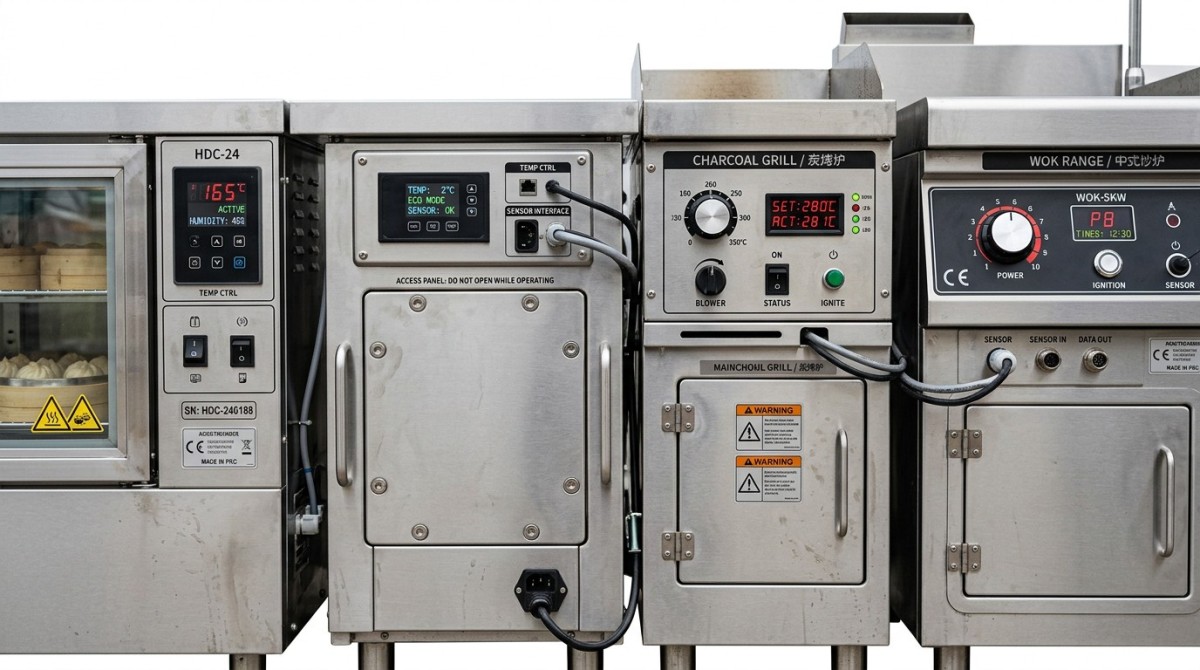
The first hidden cost usually appears before the equipment is switched on. A quoted machine price may cover the core unit, but not the site readiness work that supports it. In commercial kitchens, automation often requires additional electrical capacity, gas line adjustment, drainage work, ventilation balancing, or data connectivity. Even a single automated line can trigger 4 to 6 supporting tasks.
A Charbroiler or Wok Range integrated into a semi-automated cookline may increase demand on extraction and make-up air systems. A Refrigerated Worktable linked to inventory or temperature monitoring may need network ports, sensors, and configuration support. If these costs are not included in the initial proposal, the project budget can rise by 10% to 25% before commissioning.
Another common gap is layout adaptation. Automated kitchen equipment performs best when product flow, operator reach, and cleaning access are planned correctly. If an existing kitchen was built for manual work, aisles, pass-through zones, and landing surfaces may need redesign. Small changes in spacing can affect food safety, labor movement, and maintenance access every day.
For buyers in multi-site foodservice operations, there is also a standardization cost. Equipment may fit one branch easily but require custom utility adjustments at 5 or 10 other sites. That turns a simple procurement exercise into a phased rollout project with engineering review, local compliance checks, and different installation windows.
Typical pre-installation items often excluded from a sales pitch
The table below outlines where costs often emerge outside the equipment line item. These are not unusual exceptions; they are routine implementation factors in commercial kitchen automation projects.
The key takeaway is simple: automation spending starts long before production benefits appear. Buyers should ask for a line-by-line implementation scope, not just a machine quotation, and confirm what is included in installation, commissioning, and site preparation.
Early planning checklist
- Verify electrical load, gas requirements, and exhaust compatibility before approval.
- Check whether the kitchen needs 600 mm, 800 mm, or larger clearance zones for safe maintenance.
- Confirm whether digital equipment needs Wi-Fi, LAN, cloud access, or local control only.
- Request a staged timeline covering delivery, install, testing, and operator handover.
Operational Costs That Continue After Go-Live
Once kitchen automation is active, the next wave of hidden costs moves into operations. Buyers often focus on labor reduction, but automated kitchen systems also change utility usage, cleaning routines, calibration frequency, and downtime sensitivity. A system that saves 2 labor hours per shift may still lose value if it increases service interruptions or requires specialist maintenance every 60 to 90 days.
Energy consumption is one example. A Heated Display designed for stable temperature holding may improve food quality and reduce waste, yet its all-day energy profile differs from manual batch holding. Likewise, automated refrigeration systems can improve visibility and compliance while increasing monitoring hardware, controller servicing, and replacement sensor costs over time.
Cleaning is another underestimated category. Smart kitchen equipment often includes touch panels, probes, tracks, moving parts, or enclosed modules that need more disciplined sanitation protocols. If staff are not trained in correct daily, weekly, and monthly cleaning cycles, hygiene standards decline and component life can shorten significantly.
Downtime carries a higher cost in automated environments because workflows become interdependent. When one connected component fails, adjacent equipment or digital controls may also be affected. In a busy service period, 30 minutes of lost output can mean delayed orders, quality inconsistency, and pressure on labor teams who must switch back to manual production.
Hidden operational cost drivers
The following list helps operators and purchasing teams identify recurring expenses that should be modeled into annual budgets, especially for high-throughput kitchens processing 200 to 1,000 meals per day.
- Preventive maintenance visits, often scheduled every 3, 6, or 12 months depending on equipment type.
- Wear parts such as seals, sensors, ignition components, filters, and thermostatic controls.
- Software support, firmware updates, remote diagnostics, and subscription-based dashboards.
- Cleaning chemicals and extra labor time for automated or enclosed systems.
- Short-term output loss during recalibration, service intervention, or staff transition.
For decision-makers, this means cost analysis should move beyond simple acquisition price and estimated labor savings. A better model combines energy, service, consumables, and downtime risk over at least 36 months. In many cases, that broader view changes which equipment package delivers the stronger return.
Annual cost comparison by operating category
This comparison shows why two automation options with similar purchase prices can produce very different yearly operating costs in a restaurant, hotel kitchen, or central production unit.
The most practical approach is to request a 12-month support estimate before signing. Ask suppliers to separate consumables, preventive service, emergency response, software access, and expected replacement parts. That makes comparison more accurate and easier for procurement teams to validate.
Training, Change Management, and Productivity Gaps
Training is one of the least visible but most influential costs in kitchen automation. Even intuitive commercial kitchen equipment changes daily habits. Staff need to understand loading patterns, safety routines, recipe programming, fault alerts, and cleaning sequences. Without structured onboarding, the equipment may be technically functional but operationally underused.
Many projects budget only for a handover session lasting 2 to 4 hours. In reality, kitchens with shift turnover, multilingual teams, or seasonal labor may require 2 to 3 rounds of training across several weeks. This is especially relevant for central kitchens and hotels where output consistency matters across breakfast, banquet, and à la carte production.
There is also a temporary productivity dip after installation. During the first 1 to 3 weeks, throughput may slow as operators adapt to new controls and revised workflows. If management assumes immediate performance gains, they may underestimate staffing needs during the transition period and place unnecessary pressure on teams.
For procurement and executive teams, training should be treated as an implementation investment rather than a soft cost. Skilled use improves food quality, reduces misuse-related service calls, and supports faster payback. Poor training, by contrast, creates hidden spending through errors, waste, and repeated troubleshooting.
What effective training should include
- Role-based instruction for line cooks, supervisors, maintenance staff, and branch managers.
- Standard operating procedures for start-up, shut-down, emergency override, and sanitation.
- Visual guides near equipment for key settings, safe temperature ranges, and alarm handling.
- Refresh sessions after 30 to 60 days to correct misuse patterns and optimize performance.
Why change management affects total automation cost
Kitchen automation changes more than equipment operation. It often changes labor allocation, prep timing, batching logic, and service sequencing. A Heated Display may hold products more reliably, but that also alters when food is finished, staged, and replenished. A smart prep station may reduce manual steps but require tighter data entry discipline.
These shifts can create friction if teams are not involved early. Operators may bypass programmed settings, managers may revert to old prep habits, and maintenance teams may receive fault calls caused by procedural errors rather than equipment issues. The result is a cost that does not appear on the invoice but shows up in output inconsistency and slower adoption.
Businesses with multiple locations should create a repeatable launch model. That usually includes a pilot site, a 2-stage training program, site-specific SOP adjustments, and a review checkpoint after 14 or 30 days. This reduces variation and makes future kitchen automation investments easier to scale.
Procurement Questions That Reduce Financial Surprises
A strong procurement process can prevent many hidden automation costs before contracts are signed. The most useful question is not “What does the equipment cost?” but “What does the full operating system cost across supply, installation, training, service, and replacement support?” That framing gives purchasing teams a more reliable basis for comparing offers.
In the kitchen equipment sector, lead times and spare parts access are critical. Imported components may involve 4 to 12 weeks for replenishment depending on region and product complexity. For restaurants or food processing facilities running 6 or 7 days per week, a delayed part can quickly outweigh any initial price advantage.
Service coverage is another overlooked factor. If support is limited to remote diagnostics or available only in major cities, emergency response may not match operational needs. Buyers should ask whether response targets are 24 hours, 48 hours, or longer, and whether temporary workaround guidance is part of the service package.
Procurement teams should also examine compatibility with existing kitchen assets. If the new automation layer cannot communicate with current refrigeration, holding, or monitoring systems, integration costs will rise. In some cases, a slightly simpler solution with broader compatibility produces better long-term value than a more advanced but isolated platform.
Decision framework for buyers and managers
The table below can be used in vendor review meetings to move beyond purchase price and compare kitchen automation proposals on operational relevance.
This type of comparison helps align information researchers, operators, buyers, and executives around the same decision logic. It also creates a record of assumptions that can be reviewed after launch to measure whether the kitchen automation investment is delivering as expected.
Five contract points worth confirming
- Commissioning criteria and acceptance standards for temperature, safety, and workflow function.
- Warranty exclusions related to cleaning errors, voltage issues, or improper ventilation.
- Availability of critical spare parts for 24 months or more.
- Software ownership, user limits, and update fees.
- Named responsibilities between supplier, installer, and third-party contractor.
How to Build a More Accurate ROI and Implementation Plan
A realistic return-on-investment model for kitchen automation should include both financial and operational measures. Financial inputs typically include equipment price, installation, support contracts, labor impact, and utility changes. Operational inputs should include throughput per hour, batch consistency, food safety control, downtime exposure, and training load. Without both sets of data, ROI can appear stronger on paper than it performs on the floor.
For most commercial kitchens, a practical evaluation window is 24 to 36 months. That period is long enough to capture service cycles, staff turnover, and seasonal demand changes. If the business operates multiple formats such as quick service, hotel banquet, and central production, ROI should be modeled separately because labor patterns and output targets differ significantly.
It is also wise to use a phased implementation plan. Rather than automating 100% of a kitchen at once, many businesses start with one bottleneck area such as holding, prep, or high-volume cooking. This reduces disruption, simplifies training, and provides real operating data before expanding into adjacent processes.
A well-managed rollout usually has 4 stages: site audit, technical confirmation, pilot launch, and review-based expansion. Each stage should have measurable checkpoints, such as service speed, food holding accuracy, cleaning time, and maintenance incidents during the first 30, 60, and 90 days.
Practical ROI inputs to track
- Average labor hours saved per day and whether savings are redeployed or removed.
- Energy and utility variance by equipment category after 30 days and 90 days.
- Waste reduction from more stable holding, cooking, or refrigeration control.
- Service incidents per month and average recovery time.
- Operator compliance with programmed settings and cleaning procedures.
FAQ: Questions buyers often ask before investing
How long does a kitchen automation project usually take?
For a single site with moderate complexity, supply and implementation often take 4 to 10 weeks. If utility upgrades, ventilation changes, or software integration are required, the timeline can extend to 12 weeks or more. Multi-site rollouts usually need a pilot phase before broader deployment.
Which operations benefit most from partial automation?
High-volume restaurants, hotel kitchens, central kitchens, and food processing facilities often gain the most from automating repetitive, temperature-sensitive, or labor-intensive tasks. Holding, prep, portion control, and consistent cooking are common starting points because the gains are easier to measure.
What is the most common budgeting mistake?
The most common mistake is treating automation as a one-time equipment purchase. In practice, budgeting should include installation, training, preventive service, cleaning process changes, spare parts, and at least one productivity adjustment period during the first 30 to 90 days.
How can operators reduce hidden costs after installation?
The best steps are consistent operator training, preventive maintenance scheduling, clear SOPs, and regular review of alarms, cleaning records, and downtime patterns. These actions help maintain performance and reduce avoidable service calls.
Kitchen automation can absolutely improve consistency, speed, and labor efficiency, but the strongest investment decisions come from understanding the full cost picture. Utility readiness, integration work, operator training, preventive maintenance, spare parts access, and workflow redesign often determine whether the project delivers long-term value or recurring budget pressure.
For information researchers, operators, procurement teams, and business leaders, the most reliable approach is to compare solutions using total cost of ownership, not equipment price alone. If you are evaluating a Heated Display, Refrigerated Worktable, Charbroiler, Wok Range, or a broader smart kitchen system, build your plan around implementation detail, service support, and measurable operating outcomes.
To discuss your application, compare equipment options, or get a more realistic deployment checklist, contact us for a tailored kitchen automation solution and detailed product consultation.
Popular Tags
Kitchen Industry Research Team
Dedicated to analyzing emerging trends and technological shifts in the global hospitality and foodservice infrastructure sector.
Industry Insights
Join 15,000+ industry professionals. Get the latest market trends and tech news delivered weekly.
No spam. Unsubscribe anytime.



Contact With us
Contact:
Anne Yin (Ceramics Dinnerware/Glassware)
Lucky Zhai(Flatware)